
Download Embed Generator – Free Discord Embed Builder, AI‑Assisted Message Designer
Overview
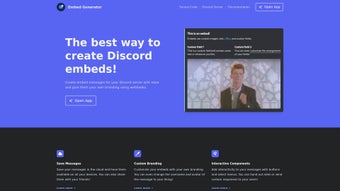
Discord communities thrive on clear, eye‑catching communication, yet many server owners struggle with the technicalities of JSON‑based embed creation. Embed Generator steps into this gap as a browser‑based, no‑code solution that empowers anyone—from seasoned bot developers to casual hobbyists—to design rich, interactive Discord messages in minutes. The platform’s intuitive drag‑and‑drop interface feels more like a social‑media post editor than a developer tool, allowing users to add titles, descriptions, images, fields, and color accents with a few clicks.
Real‑time preview ensures that the final embed looks exactly as intended before it ever reaches a live channel. What truly distinguishes Embed Generator is its cloud‑first architecture: every embed is automatically saved to a personal workspace that syncs across devices, eliminating the need for manual JSON exports or local file management. Users can generate shareable edit links, invite collaborators, and even roll back to previous versions via built‑in version history.
Beyond static content, the tool supports Discord’s interactive components—buttons, select menus, and role‑distribution panels—transforming simple announcements into dynamic experiences that drive engagement. For teams that require branding consistency, the White‑Label option lets you attach your own bot token, set a custom username and avatar, and send messages that appear to originate directly from your server’s bot. An AI‑assisted drafting assistant further speeds up creation by suggesting copy, emojis, and formatting based on the context you provide.
Comprehensive documentation, video tutorials, and an active community forum ensure that newcomers can get up to speed quickly while power users can explore advanced command logic and automation. In short, Embed Generator delivers a secure, free, and constantly updated environment for anyone looking to elevate Discord communication with professional‑grade embeds.
Supported on any modern web browser, Embed Generator runs seamlessly on Windows, macOS, Linux, Chrome OS, iOS Safari, and Android Chrome, making it truly cross‑platform and accessible from desktop or mobile devices.
Core Capabilities: Features, Installation & Usage
- Intuitive Visual Builder – Drag‑and‑drop fields, live preview, and instant JSON export.
- Interactive Components – Buttons, select menus, role‑assign panels, and custom link actions.
- AI‑Assisted Drafting – Generate message copy, suggest emojis, and auto‑format with a single click.
- White‑Label Bot Integration – Use your own bot token, customize username and avatar for seamless branding.
- Custom Command Engine – Define triggers, conditional logic, and automated replies without coding.
- Cloud Workspace & Sharing – Save embeds in the cloud, access from any device, and share edit links with teammates.
- Template Library – Ready‑made designs for announcements, event promos, polls, and role distribution.
- Comprehensive Documentation – Step‑by‑step guides, video tutorials, and a community forum.
- Secure Data Handling – End‑to‑end encryption for stored embeds and OAuth‑protected bot connections.
- Regular Updates – New components, bug fixes, and Discord API compatibility patches released monthly.
Getting started requires no download; simply navigate to the official website, click “Sign Up,” and create a free account using an email address or Discord OAuth. After confirming your email, you land on the dashboard where the “New Embed” button launches the visual builder. From here, you can set the embed’s title, description, color, thumbnail, and author fields by clicking the corresponding icons on the left‑hand toolbar. Adding interactive elements is as simple as selecting “Add Component,” choosing the desired button or menu, and customizing its label, URL, or role ID. Each component automatically generates the correct Discord JSON structure, sparing you any manual coding.
When you’re satisfied with the design, press “Save to Cloud.” The embed receives a unique, shareable URL and is stored securely under your account. To integrate with a bot, open the “White‑Label” tab, paste your Discord bot token, and adjust the displayed username and avatar. You can then either copy the generated JSON payload for use in your own code or click the built‑in “Send via Bot” button, which will dispatch the embed directly to a channel you select from a dropdown list. Collaboration is straightforward: invite teammates by email or Discord tag, assign them view or edit permissions, and watch changes sync in real time. Because everything runs in the cloud, there’s no need for local installations or manual updates—the service automatically applies the latest Discord API changes, ensuring continuous compatibility.
Pros, Cons, and Frequently Asked Questions
Pros
- Completely free with no hidden fees.
- Zero‑code visual editor speeds up embed creation.
- AI assistant reduces writer’s block and boosts creativity.
- Interactive components increase user engagement on Discord.
- White‑Label bot support keeps branding consistent.
- Cloud storage and sharing simplify teamwork.
- Regular updates keep compatibility with Discord’s API.
- Extensive documentation helps beginners and power users alike.
- Secure OAuth login and encrypted data storage.
- Cross‑platform – works on any modern desktop or mobile browser.
Cons
- Advanced custom command logic can be complex for non‑technical users.
- No native desktop app – relies on an internet connection.
- White‑Label feature requires a valid Discord bot token, which some users may not have.
- Limited offline editing; all changes are saved to the cloud.
- While the free tier is generous, premium templates and priority support are behind a paid plan.
Can I use Embed Generator without a Discord bot?
Yes. The visual builder lets you create the JSON payload for an embed, which you can copy and paste into any existing bot or webhook that accepts Discord embed data. However, to use the White‑Label feature or send messages directly from the platform, you’ll need to connect a bot token.
Is my embed data safe on the cloud?
Absolutely. All stored embeds are encrypted at rest, and the platform uses HTTPS for data transmission. Access is protected by OAuth login, and you can control who has edit or view permissions on each embed.
Do I need any technical knowledge to add interactive buttons?
No. Adding a button is as simple as dragging the component into the builder, setting the label, URL, and optional role ID. The platform automatically generates the correct Discord component JSON for you.
Can I export my embeds for backup?
Yes. Each embed can be exported as a .json file from the “Export” menu. This file can be stored locally or imported back into the platform later.
Is there a mobile‑friendly version?
The web app is fully responsive, so you can create and edit embeds from smartphones or tablets. The experience is optimized for touch input, though complex command logic is easier on a desktop browser.
Embed Generator delivers a polished, no‑code experience for crafting Discord embeds. Its AI assistance and interactive components make it stand out from generic JSON editors, while the cloud workspace streamlines teamwork. The only drawback is the learning curve for advanced command logic, but for most servers the free tier provides everything needed to create eye‑catching announcements.
Conclusion & Call to Action
If you’re looking to boost engagement on your Discord server without diving into code, Embed Generator is the tool that bridges creativity and functionality. Its free, web‑based interface lets you design professional‑grade embeds, add interactive buttons, and even integrate your own bot for a seamless brand experience. The AI‑driven drafting feature cuts down on writer’s block, while the cloud‑save system guarantees that your work is always accessible and shareable.
Whether you run a gaming community, a developer hub, or a hobbyist club, the platform scales to fit any size of audience. The responsive design ensures you can craft messages from a laptop at home or a phone on the go, and the regular updates mean you’ll never be left behind when Discord rolls out new features. Ready to transform your server’s communication?
Download Embed Generator now and start building dynamic Discord messages that keep members informed and excited.



.png)



